QuickBooks for Civil Engineering
QuickBooks Online Progress Invoicing Limitations: What Civil Firms Need To Know Before Relying On It
QuickBooks Online progress invoicing enables staged billing, but the 100% estimate cap and limited retainage support can create real constraints for civil engineering firms. Learn the key limitations and practical workarounds.
Progress invoicing in QuickBooks Online lets you bill in stages from a single estimate, but there is a hard 100% cap that prevents invoicing beyond the original estimate -- a serious constraint on change-heavy civil projects.
Key Takeaways
| Question | Short Answer |
|---|---|
| How does progress invoicing in QuickBooks Online work with estimates? | QuickBooks lets you create multiple partial invoices from a single estimate, but you cannot bill beyond 100% of that estimate. |
| Is progress invoicing available in all QuickBooks Online plans? | No. The Projects feature most civil firms rely on is only available in Plus, Advanced, and Accountant plans. |
| Can I use progress invoicing in the new QuickBooks Online invoice layout? | Currently no. Many firms must switch back to the old layout or use external tools like the free construction billing tools. https://projbill.com/tools |
| What must be enabled before using progress invoicing? | Turn on progress invoicing in Account and Settings and create an estimate first. |
| How can I handle retainage and detailed civil pay applications? | Many firms use dedicated tools such as the AIA G702/G703 Pay Application Generator. https://projbill.com/tools/aia-g702-g703-generator |
| What if I need detailed WIP and over/under billing visibility? | QuickBooks alone does not provide construction-grade WIP reporting -- see the WIP Schedule Mini-Builder. https://projbill.com/tools/wip-schedule-builder |
| Is there a way to streamline civil progress billing on top of QuickBooks? | Yes. The Progress Billing Dashboard is designed for civil engineers using QuickBooks. https://projbill.com/dashboard/progress-billing |
1. How QuickBooks Online Progress Invoicing Works Today
QuickBooks Online progress invoicing is built around the estimate, not the project contract -- a critical distinction for civil and construction work.
To use the feature:
- Enable progress invoicing
- Create an estimate
- Convert it into multiple partial invoices
From that estimate, you can bill by percentage or by a specific dollar amount for each line item. The feature integrates with Project Center so that when estimates are tied to projects, you gain basic job-level views of activity and profitability.
For civil firms, QuickBooks can handle simple staged billing -- such as 30 percent design, 60 percent design, and final submission. However, as projects evolve, change orders, retainage, and complex schedules of values quickly push beyond what the core feature was designed to support.
Understanding this estimate-centric structure is essential because most real-world limitations stem directly from it.
2. Projects vs. Estimates: Why the Structure Matters for ProjBill
QuickBooks Online separates Projects and Estimates, although many civil firms think of the contract as a single living document.
- Projects act as a container for transactions.
- Estimates function as proposals that feed progress invoicing.
The Projects feature -- often essential for civil engineering workflows -- is only available in Plus, Advanced, and Accountant plans.
How Projects and Progress Invoicing Interact
When combined, estimates support partial invoicing while the project view aggregates costs and revenues. Many firms interpret this as project-based progress billing.
The limitation is that QuickBooks still evaluates billing against each estimate's total rather than the entire contract -- especially when supplements and change orders accumulate.
A common workaround is creating multiple estimates per project, typically one for each major scope or change order. While this preserves billing functionality, it spreads contract logic across several documents instead of maintaining a single, clear schedule of values.
As the estimate list grows, reconciling billed-to-date versus remaining contract value becomes increasingly difficult without external reports or tools.
3. The 100 Percent Cap and Estimate-Centric Limitations
One of the most significant constraints in QuickBooks Online progress invoicing is the 100 percent cap -- you cannot invoice beyond the original estimate amount.
In practice, if your contract grows, you must revise the estimate or create a new one before billing additional revenue. For civil contracts that frequently change, this introduces administrative overhead and increases the risk of billing errors.
Why the 100 Percent Cap Matters on Real Projects
Many agencies and prime contractors issue supplements or revised scopes after award. Under the QuickBooks model, every adjustment requires estimate maintenance or progress invoicing will block further billing.
This also affects retainage workflows. Firms typically bill 100 percent of contract value before releasing retainage, so any contract increase must be reflected in the estimate to avoid hitting the cap prematurely.
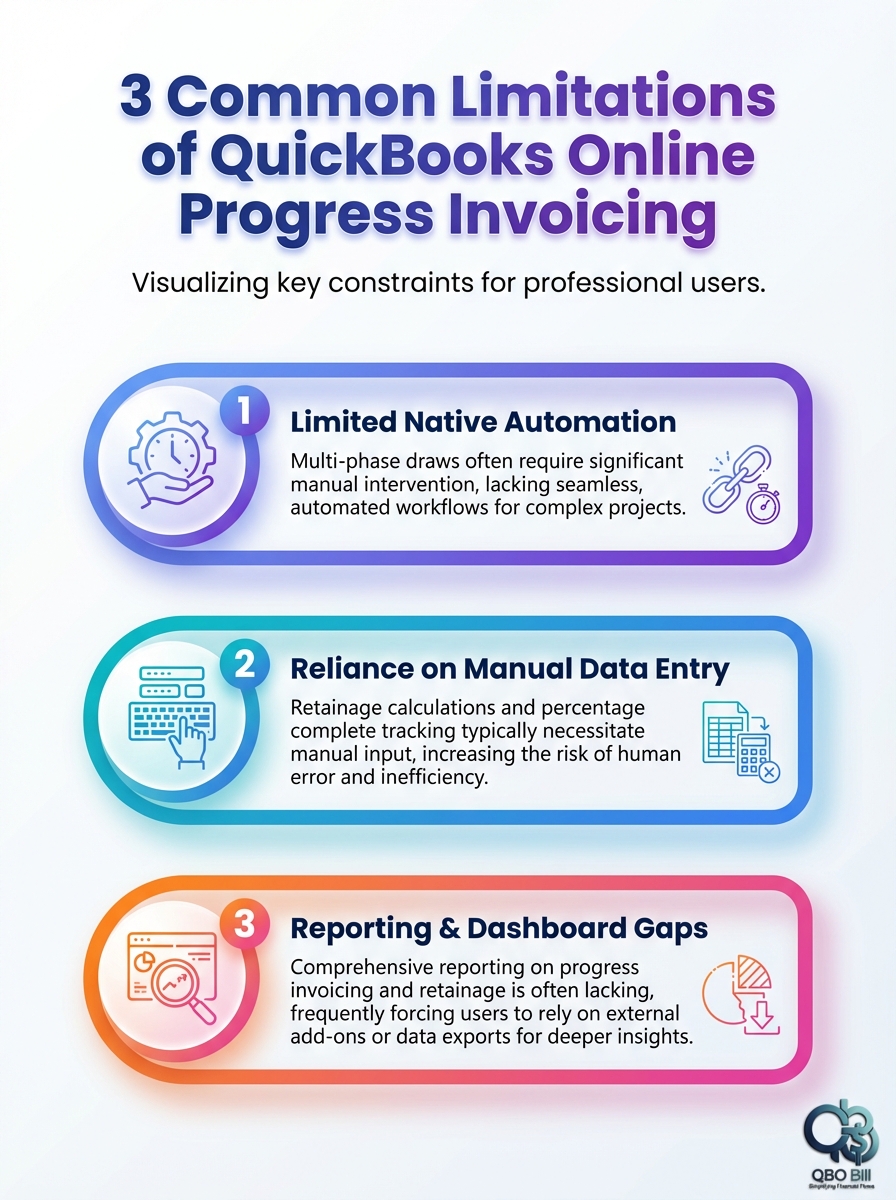
This infographic highlights three common limitations of QuickBooks Online progress invoicing and what they mean for your workflow.
Did You Know?
You cannot bill more than the remaining estimate balance in QuickBooks Online progress invoicing -- even if your actual contract value has increased.
Many firms export data into spreadsheets or calculators to compute accurate "to date" and "this period" values before entering final invoice totals back into QuickBooks.
4. Layout Changes: Progress Invoicing and the New Invoice Experience
QuickBooks Online is transitioning to a new invoice layout, and progress invoicing is not supported in the new experience.
To continue using the feature, many firms must revert to the old layout -- where that option still exists.
For numerous Plus and Advanced users, migration began in 2024, and some organizations were moved without the ability to revert. Losing access forces teams to either alter workflows or adopt external billing tools.
Impact on Day-to-Day Billing
This is more than a cosmetic change. If your firm relies heavily on progress invoicing, the new layout can disrupt established processes.
Even where toggling layouts is possible, staff must remember to switch formats, introducing inconsistency and training overhead.
Recommendation: Document which invoice layout your firm will use and standardize it across the organization.
5. Enabling Progress Invoicing: Setup Overhead and Workflow Friction
Progress invoicing is not enabled by default.
To activate it:
- Navigate to Settings > Account and Settings > Sales
- Enable Create multiple partial invoices from a single estimate
Each project then requires at least one estimate to drive billing -- adding a mandatory step compared to creating invoices directly.
Setup Steps That Affect Your Team
- Turn on progress invoicing
- Create estimates for each contract or change order
- Convert estimates into partial invoices
- Repeat as billing progresses
This structure assumes your estimate mirrors how clients expect to see billing progress. If your schedule of values is more detailed than the estimate, you may end up reconciling two separate frameworks.
For larger firms with public infrastructure contracts and frequent change orders, this cumulative friction is often why progress tracking shifts into specialized tools while QuickBooks remains the accounting system of record.
6. What QuickBooks Online Progress Invoicing Handles Well
Despite its constraints, QuickBooks performs well in simpler scenarios.
Good Fits for Native Progress Invoicing
- Fixed-fee design projects with milestone billing
- Short-duration civil jobs with minimal change orders
- Private clients comfortable with high-level invoices
In these cases, enabling progress invoicing, structuring estimates around milestones, and converting them as stages complete is often sufficient.
To maximize clarity, design estimates so each line item reflects how progress is reported to clients -- not just internal cost codes.
7. Where QuickBooks Online Progress Invoicing Falls Short for Civil Firms
Complex contracts expose the platform's limitations.
| Scenario | Limitation | Common Workaround |
|---|---|---|
| Multi-phase contracts | Estimates become difficult to manage across hundreds of lines. | Use a phase-based calculator such as the Prior vs Current Bill Splitter. |
| Heavy retainage | No native retainage ledger tied to progress percentages. | Compute retainage externally and enter net values on invoices. |
| AIA or agency pay applications | QuickBooks invoices do not match required formats. | Use the AIA G702/G703 Generator to produce compliant pay apps. |
| WIP visibility | Projects provide insight but not construction-grade WIP reporting. | Build WIP schedules with tools like the WIP Schedule Mini-Builder. |
Another structural challenge is that progress invoicing ties billing to estimates rather than a master contract, making it easy to lose sight of cumulative billed-to-date totals across supplements.
Did You Know?
Progress invoicing is not supported in the new QuickBooks invoice experience -- you must use the classic layout to create partial invoices.
8. Using External Tools to Offset QuickBooks Limitations
Many civil firms use QuickBooks as the system of record while managing contract structure and progress tracking externally.
For example, the Progress Billing Calculator allows firms to enter contract value, prior billings, percent complete, and retainage -- without being constrained by the estimate cap:
https://projbill.com/tools/progress-billing-calculatorExamples of Helpful Add-On Tools
- Progress Billing Calculator
- Lump Sum Progress Billing Tracker
- Prior vs Current Bill Splitter
- WIP Schedule Mini-Builder
- AIA G702/G703 Generator
Each tool is free and requires no sign-up, making them practical extensions to an existing QuickBooks workflow.
Once accurate billing numbers are calculated, final invoice totals can still be posted in QuickBooks.
For deeper integration, the Pro plan ($99/month) includes:
- Full QuickBooks integration
- Unlimited projects
- Progress billing reports
- Time tracking and labor cost visibility
- PDF and CSV exports
This approach allows QuickBooks to manage the general ledger while civil-specific logic runs on top.
9. Integrating QuickBooks Projects With ProjBill Workflows
Projects provide a basic view of income, costs, and profitability, but they are not tailored to civil billing structures such as retainage ledgers or schedules of values.
Integration bridges that gap.
By syncing project, estimate, and invoice data, firms can calculate progress, retainage, and over/under billing without being locked into estimate caps or layout changes.
The objective is not to replace QuickBooks -- but to extend it so your billing workflow remains consistent regardless of platform updates.
10. Practical Tips to Work Around Progress Invoicing Limitations
- Standardize estimate structure so each line maps to client-facing progress.
- Document change-order policies to avoid unexpected estimate caps.
- Choose a single invoice layout and train staff accordingly.
- Validate retainage and progress math externally for complex jobs.
- Build WIP reports outside QuickBooks when construction-grade visibility is required.
Whenever possible, test new workflows on a pilot project before rolling them out firm-wide.
Conclusion
QuickBooks Online progress invoicing provides a solid foundation for staged billing, but civil firms should understand its constraints:
- A strict 100 percent cap
- Invoice layout conflicts
- Limited retainage support
- Incomplete WIP reporting
By understanding where native tools succeed -- and where they fall short -- you can design a billing workflow that blends QuickBooks with specialized calculators, pay application generators, and integrated dashboards.
The result is a more reliable, scalable progress billing process that supports the real-world complexity of civil engineering projects.