QuickBooks Online
QuickBooks Online Bank Feed Mismatches And Duplicates: How To Find, Fix, And Prevent Costly Errors
Learn how to identify, fix, and prevent duplicate bank feed transactions in QuickBooks Online. Discover the causes, cleanup strategies, and workflows that keep reconciliations accurate.
Bank feed problems in QuickBooks Online can escalate quickly, and we regularly see cases where 15 months of bank feed transactions are duplicated after a single bank update, completely disrupting reconciliations and reporting.
Key Takeaways
| Question | Answer |
|---|---|
| How do I know if my QuickBooks Online bank feed has mismatches or duplicates? | Check for unexpected changes in reconciled balances, duplicate lines in the Banking tab, or totals that do not match your bank. Tools like the free calculators at ProjBill Tools can help you cross-check totals. https://projbill.com/tools |
| What causes duplicate bank feed transactions in QBO? | Reconnecting feeds, mixing CSV imports with live feeds, and auto-rules that auto-add instead of match existing entries are the most common triggers. |
| How do I fix duplicate transactions without breaking reconciliations? | Exclude duplicates in the Banking tab, remove already-added duplicates from the register, and compare against contract and invoice data before deleting anything. |
| Why is my bank connection failing? | Security changes, expired credentials, or connection updates often cause disconnects. Always review for backloaded historical data after reconnecting. |
| How can I prevent misclassified expenses from rules? | Keep rules narrow, avoid auto-add until patterns are proven, and review classifications regularly. |
| Is there a way to centralize billing and reduce errors? | Yes. A connected progress billing solution such as ProjBill integrates with QuickBooks so contracts, invoices, and project billing stay aligned. |
| What does a professional billing integration cost? | ProjBill's Pro plan is typically $99/month, with early access currently complimentary as noted on the Pricing page. https://projbill.com/pricing |
1. Why QuickBooks Online Bank Feed Mismatches And Duplicates Matter So Much
Bank feeds are designed to save time, but when they malfunction they can quietly distort every key number you rely on - from cash balance to project profit.
For construction and civil firms working on tight margins, inflated income or duplicated expenses can mislead owners for months before anyone spots the pattern.
We see three recurring problems:
- Duplicate transactions
- Failed or disconnected feeds
- Misclassified expenses caused by aggressive automation rules
Each can affect daily cash management and high-level reporting, including progress billing and WIP schedules.
2. How QuickBooks Online Bank Feeds Work Behind The Scenes
QuickBooks connects through your bank's online interface, imports data in batches, then attempts to match transactions using:
- Date
- Amount
- Payee
- Memo patterns
When QuickBooks cannot find a match, it suggests "Add."
Problems begin when QBO adds transactions that already exist or when configuration choices create parallel data streams.
3. Common Causes Of Duplicate Transactions
Duplicate transactions typically occur when:
- A bank updates its connection method
- A feed is reconnected after a disconnect
- CSV imports overlap with live feeds
- Auto-rules add transactions created elsewhere
- Receipt matching fails
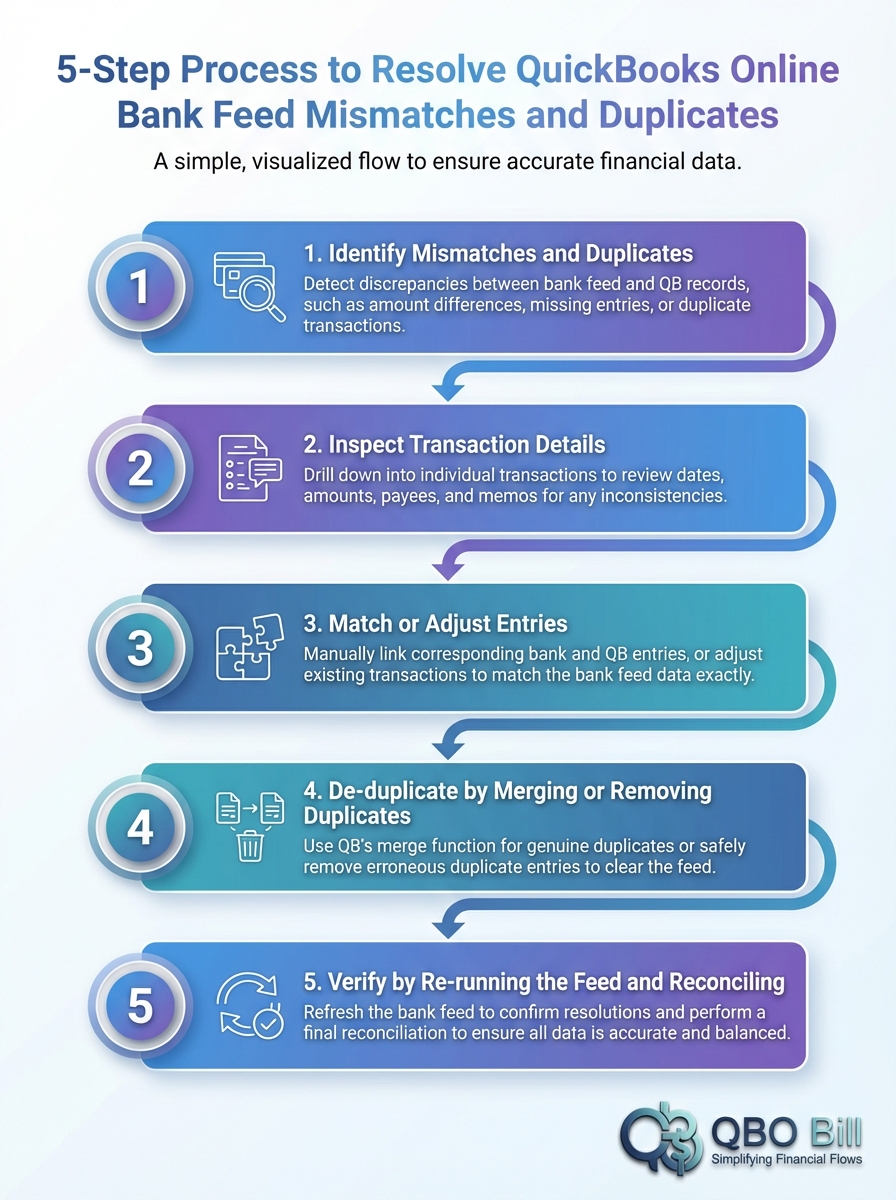
This infographic outlines a practical five-step method for resolving bank feed mismatches.
4. Identifying Duplicates Before They Hit Your General Ledger
The easiest cleanup is the one you never have to perform.
Start in the Banking tab and compare "Reviewed" vs. "For review."
Look for:
- Identical dates and amounts
- Sudden spikes in transaction volume
- Re-imported historical data
Checklist:
- Sort feeds by date
- Compare totals with your bank portal
- Verify added transactions
- Exclude suspect items
Did You Know?
Cleanup in one real case required two full days to delete thousands of duplicates.
5. Fixing Existing Duplicates Without Damaging Reconciliations
When duplicates reach the register, cleanup must be deliberate.
Recommended workflow:
- Export recent bank statements
- Filter the register around the problem period
- Confirm transactions against the statement
- Delete only confirmed duplicates
If revenue ties to progress billing, compare totals with external tools such as a WIP schedule builder before final reconciliation.
6. Failed Or Disconnected Bank Feeds: Safe Reconnect Practices
Before reconnecting:
| Step | Action |
|---|---|
| 1 | Note the last reconciled statement date |
| 2 | Confirm ending balances match |
| 3 | Use QBO's official reconnect flow |
| 4 | Filter feeds to new activity only |
| 5 | Exclude re-imported transactions |
Early exclusion prevents duplicates from entering the general ledger.
7. Misclassified Expenses From Rules
Automation rules can silently skew job cost and margin analysis.
Best practices:
- Review rules regularly
- Avoid broad auto-add rules
- Disable high-risk patterns
- Batch recategorize errors
Did You Know?
Auto rules can generate duplicates when transactions are captured from multiple sources.
8. Using ProjBill To Reduce Feed-Related Errors
For civil firms, separating operational billing from bank data capture is critical.
ProjBill centralizes:
- Contract totals
- Progress billing
- Pay applications
Then syncs structured invoices into QuickBooks.
If deposits exceed recorded billings, that often signals duplicates or misclassifications.
9. Practical Workflow For Reconciling Billing And Bank Feeds
Adopt a monthly workflow:
- Finalize progress billing and WIP schedules
- Post billings to QBO
- Match receipts in the bank feed
- Investigate unmatched transactions
Tip:
If a receipt appears without a matching invoice, research it before adding it.
10. Cost, Time, And Risk: Why Prevention Beats Cleanup
Ignoring duplicates affects:
- Tax estimates
- Bonding capacity
- Pricing decisions
| Scenario | Impact | Typical Cost |
|---|---|---|
| Mass duplicate cleanup | Days of manual work | Staff + CPA time |
| Monthly feed review | Early detection | Predictable subscription |
| Misclassifications | Distorted margins | Hidden profit loss |
ProjBill's Pro plan - typically $99/month - helps prevent these issues through structured integration.
Conclusion
QuickBooks bank feed mismatches and duplicates are not minor glitches - they are operational risks that influence every financial decision.
With a structured review process, disciplined rule management, and a dedicated billing layer integrated with QuickBooks, you can keep reconciliations predictable and financials reliable.
Our recommendation is simple:
- Let project billing live in a system designed for civil workflows
- Let QuickBooks handle accounting
- Treat bank feeds as a verification tool
This approach minimizes cleanup, strengthens reporting accuracy, and allows your team to focus on delivering projects instead of fighting duplicates.